The Directorate of General Education, Kerala, has officially rolled out the centralized allotment process for Higher Secondary Courses for the 2026-27 academic year. Designed to streamline student enrollments across the state, the Single Window System (SWS) makes the application process entirely digital.
Whether you are a student or a parent preparing for the upcoming academic year, here is a comprehensive, step-by-step guide on how to successfully submit your Plus One application online.
Where to Apply
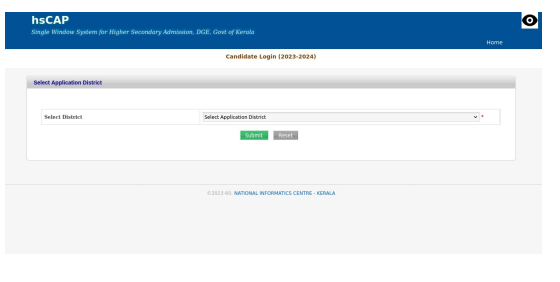
Applications must be submitted exclusively online. Students can apply by themselves using a computer or a smartphone by visiting the official Higher Secondary Admission portal:
🔗 Official Application Portal: https://hscap.kerala.gov.in/
If you require technical assistance, Help Desks have been established at the computer labs of your previous high school or nearby Government and Aided Higher Secondary Schools.
Documents and Prerequisites: What You Need to Know
One of the major conveniences of this year’s process is that most applicants do not need to upload scanned certificates. However, there are a few important exceptions to keep in mind:
- For “Other” Scheme Students: If you passed your 10th grade through boards outside the regular state scheme (like CBSE or ICSE), you must upload scanned copies of your mark list, migration certificate, or equivalency certificate.
- For Differently-Abled Candidates: You must upload a scanned copy of your medical board certificate.
- File Specifications: Any uploaded document must be in PDF format and have a file size below 100 KB.
- Bonus Points & Reservations: If you are claiming bonus points (e.g., NCC, Scouts & Guides, Little KITES) or category reservations, keep the original certificates handy. You will need to enter the exact certificate number, date, and issuing authority during the application process.
Step-by-Step Plus One Application Process
Step 1: Create Your Candidate Login
Visit the official website at hscap.kerala.gov.in and click on the “CREATE CANDIDATE LOGIN-SWS” link. You will need to select your district and enter your 10th-grade scheme details (SSLC, CBSE, ICSE, THSLC, etc.), register number, year of passing, and a valid mobile number. An OTP will be sent to this number to verify and create a secure password.
Important: Save your Application Number and Password safely, as you will need them to check allotment results later.
Step 2: Fill in Your Details
Log in using your newly generated credentials and click on “Apply Online”. You will proceed through several sections:
- Personal Details: Carefully enter your name, gender, caste, category, and guardian details.
- Contact & Residence: Accurately fill in your permanent address, Taluk, and Local Body, as residential details can influence certain bonus points.
- Bonus Points: Enter details for any extra-curricular achievements. Note that regardless of how many eligible categories you fall under, the maximum bonus points a candidate can receive is capped at 10 points.
Step 3: Enter Your Grades
For regular Kerala SSLC students, grades generally auto-populate. Students from CBSE, ICSE, or other state boards must select their respective board and enter their marks manually based on their mark lists.
Crucial Update for CBSE Students: The Single Window System enforces strict rules regarding Mathematics. If you studied “Basic Mathematics” in your 10th grade, you cannot opt for Science combinations that include Mathematics in Plus One. Only students who passed “Standard Mathematics” are eligible to select math-based Science courses.
Step 4: Submit Your School and Course Options
Before reaching this final stage, it is highly recommended to prepare a written list of your preferred school codes and course codes. Enter these options carefully into the system. You can add multiple preferences to increase your chances of securing an allotment in a desirable institution.
Final Review and Trial Allotment
Do not rush the final submission. Double-check all entries, as providing false information to secure an allotment or bonus points will result in the immediate cancellation of your admission.
Once submitted, keep an eye on the official portal at https://hscap.kerala.gov.in/. Students will be given an opportunity to rearrange, add, or delete their options after the Trial Allotment results are published.
Before filling application please check “How to Apply Online?” option in https://hscap.kerala.gov.in/
| CONTACT DETAILS: | |
|---|---|
| State Processing Centre | : 0471 2529855 |
| : 0471 2529856 | |
| Address for all Single Window Admission Related Communications: | |
| The Co-ordinator, | |
| ICT Cell (Higher Secondary Wing), | |
| SCERT Guest House Campus, | |
| Poojappura, | |
| Thiruvananthapuram- 695012 | |