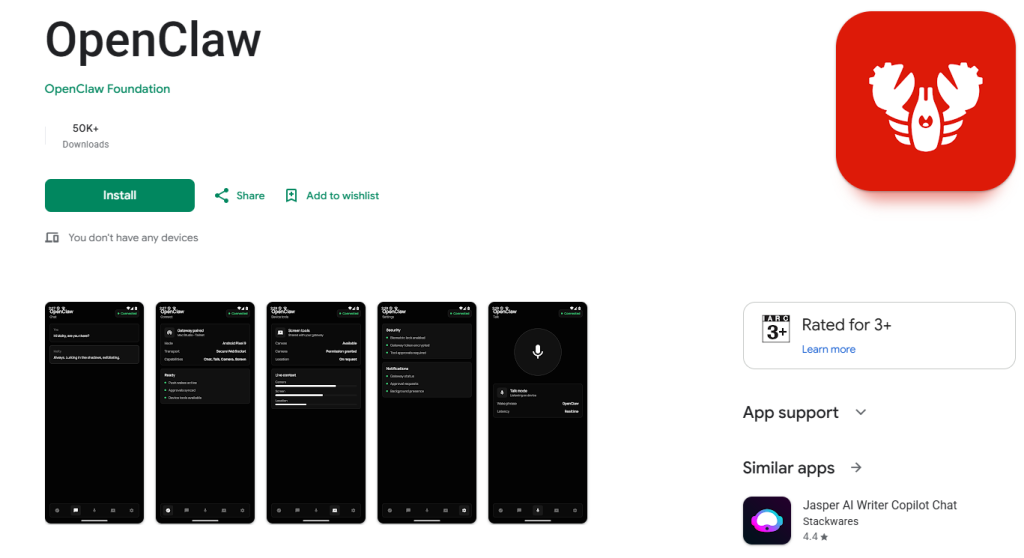
The wait is officially over for AI enthusiasts. OpenClaw, the highly anticipated open-source AI agent framework that took the developer world by storm, has officially launched its dedicated mobile apps. Users can now download OpenClaw on both Android and iOS platforms to manage their AI agents directly from their smartphones.
What is OpenClaw?
Unlike traditional AI chatbots like ChatGPT or Claude that rely entirely on centralized corporate servers, OpenClaw is designed around data privacy and local control. It operates via an “OpenClaw Gateway” hosted on your own computer or private cloud.
The newly released mobile app acts as a powerful remote control, allowing you to securely connect to your home gateway and manage your autonomous AI agents from anywhere in the world.
Key Features of the OpenClaw Mobile App
- Total Data Privacy: Your interactions and data stay within your local network (LAN) or private server rather than being fed into big-tech databases.
- Agentic Automation: OpenClaw doesn’t just answer questions; it does things. With your permission, it can access your phone’s calendar, location, camera, and gallery to automate complex tasks.
- Seamless Voice Mode: The app features an advanced voice interface, letting you talk to your AI agent naturally without typing.
- Secure Remote Access: Wirelessly sync with your personal desktop setup to trigger workflows while on the go.
From a GitHub Trend to a Global Mobile Launch
Started in late 2025 by Austrian developer Peter Steinberger, OpenClaw quickly gained viral traction on GitHub. After Steinberger joined OpenAI earlier this year, stewardship of the project was handed over to the non-profit OpenClaw Foundation to ensure it remains free and open-source.
While early users have reported a few minor bugs and connectivity hiccups—particularly on the Android version—the foundation has promised rapid updates and patches over the coming weeks to smooth out the user experience.
How to Download OpenClaw on Mobile
The app is completely free to download. You can grab the official versions directly from the app stores using the links below:
- Download for Apple Users: OpenClaw on the iOS App Store
- Download for Android Users: OpenClaw on the Google Play Store
Note: To use the mobile app, you will need an active OpenClaw Gateway running on your desktop or server. Head over to the official OpenClaw GitHub page to get your local environment set up.